Devise is great. It simplifies lots of tasks related to resource management: authentication, registration, confirmation, etc; and it does it in a clean and highly configurable way. But it is only this great if you are managing your resources locally. Devise has adapters only for models backed up with ActiveRecord or MongoId which means that if you’re using resources provided by an external webservice you can’t use Devise.
But don’t despair.
Extending Devise
First of all we have to get a basic idea of how Devise authenticates your resources. This explanation might be a bit rough so I’m going to use the following diagram to ease the explanation (kudos to asischao for his help).
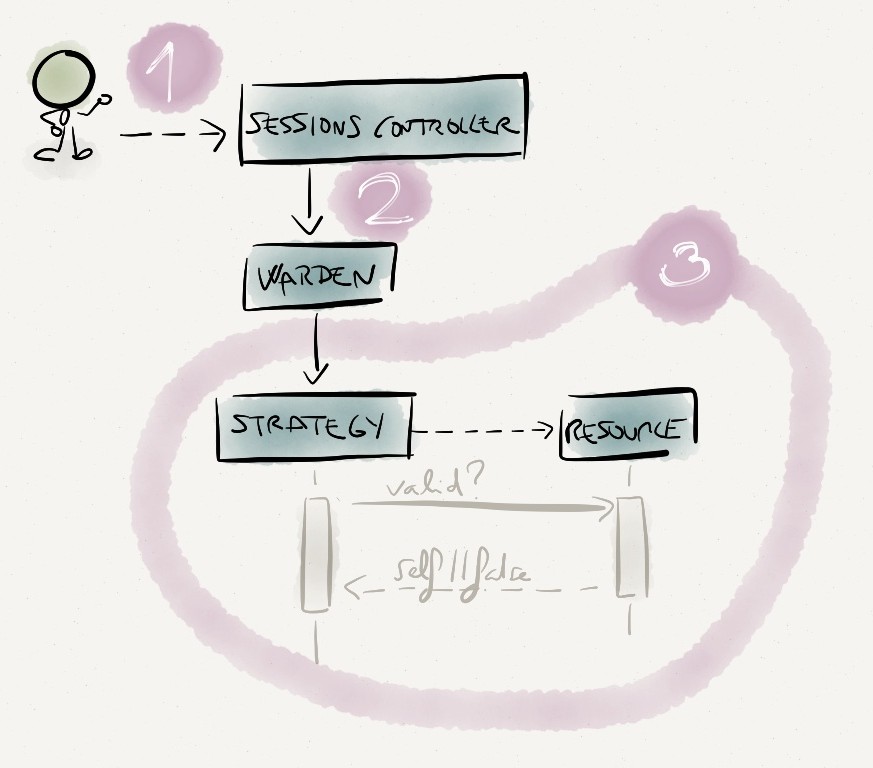
- A request to authenticate a resource is received in the Rails app and it matches a route generated by devise_for.
- The request is handled (by default) by the SessionsController, provided by Devise, which delegates the authentication to Warden
- Warden uses one of the strategies provided by Devise to determine if the resource can be authenticated or not.
The output of this process is an authenticated resource. Or not.
So, from this list of steps it seems that we have the following spots to work on:
- Configure our resource to enable remote authentication.
- Create an strategy that authenticates the resources with the external webservice.
Configuring the resource
Lets assume that our resource is a PORO called User
User PORO
|
|
Devise requires some functionallity that we usually have for free when using ActiveRecord resources. As this is not the case we have to do some plumbing: include some ActiveModel modules and extend the class using Devise::Models.
Preparation
|
|
At this point we are ready to configure Devise.
Enable Devise
|
|
Authentication module
To understand a bit better what we are doing here take a look at the following Devise modules:
- Devise::Models::Authenticatable. This module holds all the common bits related to authentication. For now we are only interested in the methods
serialize_into_sessionandserialize_from_session. - Devise::Models::DatabaseAuthenticatable. This module keeps all the logic used when authenticating a resource stored in a database.
We have to create a module that performs at least three tasks:
- Authenticate the resouce using the remote webservice.
- Return an array of data that will be used to store a reference to the resource in the session.
- Use this session data to re-build the resource.
Authenticate using the remote resource
|
|
Devise::Models::RemoteAuthenticatable#remote_authentication will be used later (in the Warden strategy) to authenticate the resource using the remote webservice. This method performs almost the same function as Devise::Models::DatabaseAuthenticatable#valid_pasword? in the sense that they both have to return a resource instance if the creedentials are valid or false otherwise.
Serialize/Deserialize
|
|
We overwrite Devise::Models::ClassMethods#serialize_into_session and Devise::Models::ClassMethods#serialize_from_session because their implementation is tied to resources using some kind of database backup. In this methods you just have to return an array with data that you’ll use later to re-build the resource instance.
The full code (with comments) of Devise::Models::RemoteAuthenticatable is on this gist
Creating an strategy
Strategies contains the logic used by Warden to authenticate users. They must define an authenticate! method, where the request will be processed. Inside this method you can take several actions:
halt!which halts the cascading of strategies.fail!fails the strategy. Calls halt!success!log in a user.- And other actions. Take a look at the documentation
Because of the conventions used by Devise, the strategy name has to be the same as the name of the module used to authenticate the resource.
Warden strategy for Devise
|
|
The previous code is pretty straightforward. We create a new resource and using Devise::Models::RemoteAuthenticatable#remote_authentication we authenticate it. If the authentication succeeds we mark the request as valid with success!.
Gist with the code, and comments, of this strategy.
Putting everything together
So, to sum up, this solution is composed of:
Devise::Models::RemoteAuthenticatable, a module used by Devise to authenticate the resource.Devise::Strategies::RemoteAuthenticatable, a class implementing a Warden strategy.
Finally, don’t forguet to configure Devise (in config/initializers/devise.rb) to use all the stuff we have done here : )
Configure Devise
|
|
via 4Trabes http://4trabes.com/2012/10/31/remote-authentication-with-devise/
Comentaris
Publica un comentari a l'entrada