Google API – Get contact list:
 Google API – Get contact list
In our new tutorial I am going to tell you about inviting friends. I think that this is the most important part for every website, a key to success. Today I will show you how to create simple and effective Gmail contact importer using OAuth authorization and API. Also, I will tell about obtaining Google API access too.
As the first step – lets prepare our own project in Google API console, please open this link and create your project. Then we need goto ‘API Access’ section and click ‘Create an OAuth 2.0 client ID’ button. Now we should fill a name for our new project:
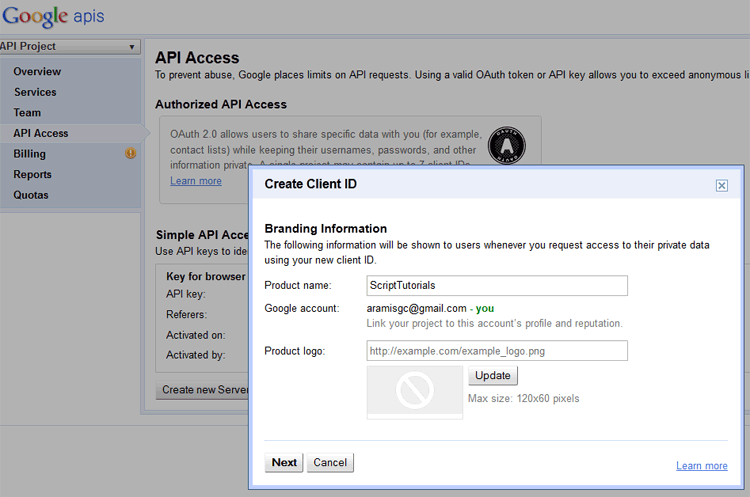
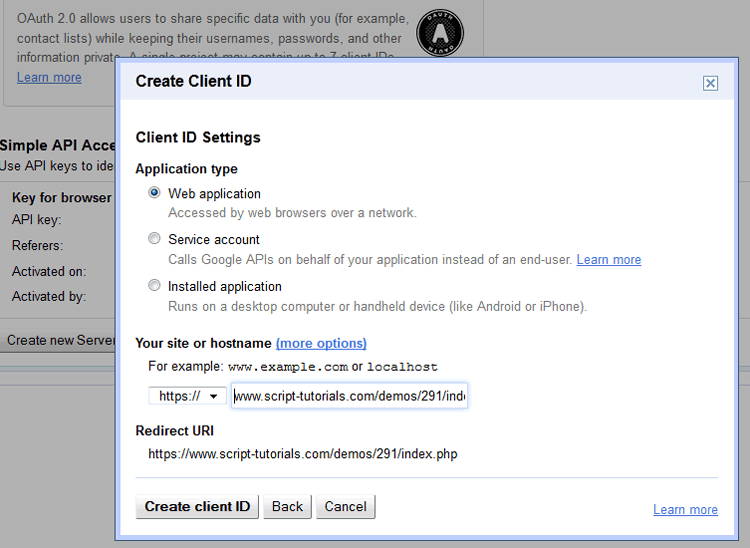
Click next, and, at the second step we should set URL of our destination page:
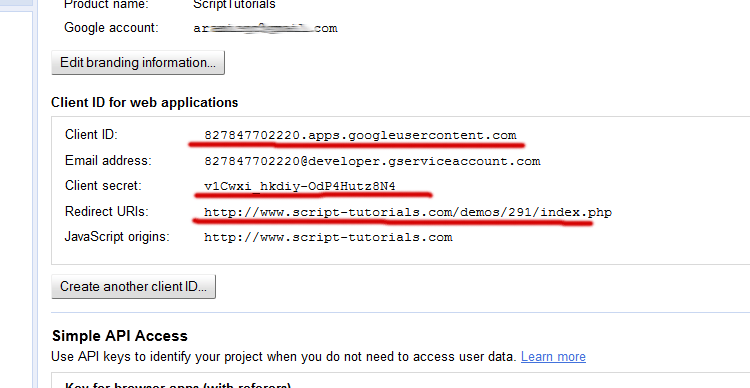
Finally, we’ve got our Client ID and secret (or – consumer key and secret):
Now – download the source files and lets start coding !
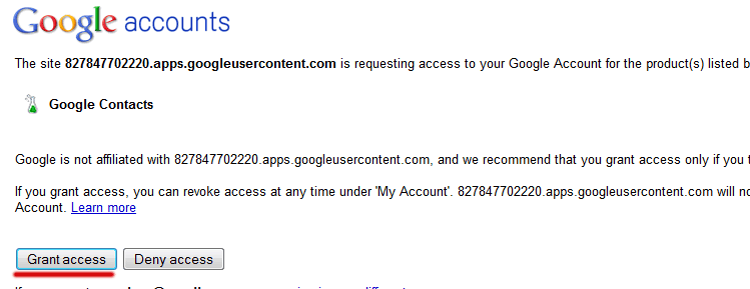
When we click authorization button, it will open google authorization page, where we should grant access for our application to get our contact list:
In our new tutorial I am going to tell you about inviting friends. I think that this is the most important part for every website, a key to success. Today I will show you how to create simple and effective Gmail contact importer using OAuth authorization and API. Also, I will tell about obtaining Google API access too.
As the first step – lets prepare our own project in Google API console, please open this link and create your project. Then we need goto ‘API Access’ section and click ‘Create an OAuth 2.0 client ID’ button. Now we should fill a name for our new project:
Click next, and, at the second step we should set URL of our destination page:
Finally, we’ve got our Client ID and secret (or – consumer key and secret):
Now – download the source files and lets start coding !
Live Demo
download in package
Step 1. PHP
Now, please create empty index.php file and put next code:index.php
<?php

// disable warnings
if (version_compare(phpversion(), "5.3.0", ">=")  == 1)
  error_reporting(E_ALL & ~E_NOTICE & ~E_DEPRECATED);
else
  error_reporting(E_ALL & ~E_NOTICE);

$sClientId = 'YOUR_GOOGLE_CLIENT_ID';
$sClientSecret = 'YOUR_GOOGLE_CLIENT_SECRET';
$sCallback = 'http://www.script-tutorials.com/demos/291/index.php'; // callback url, don't forget to change it to your!
$iMaxResults = 20; // max results
$sStep = 'auth'; // current step

// include GmailOath library  https://code.google.com/p/rspsms/source/browse/trunk/system/plugins/GmailContacts/GmailOath.php?r=11
include_once('classes/GmailOath.php');

session_start();

// prepare new instances of GmailOath  and GmailGetContacts
$oAuth = new GmailOath($sClientId, $sClientSecret, $argarray, false, $sCallback);
$oGetContacts = new GmailGetContacts();

if ($_GET && $_GET['oauth_token']) {

    $sStep = 'fetch_contacts'; // fetch contacts step

    // decode request token and secret
    $sDecodedToken = $oAuth->rfc3986_decode($_GET['oauth_token']);
    $sDecodedTokenSecret = $oAuth->rfc3986_decode($_SESSION['oauth_token_secret']);

    // get 'oauth_verifier'
    $oAuthVerifier = $oAuth->rfc3986_decode($_GET['oauth_verifier']);

    // prepare access token, decode it, and obtain contact list
    $oAccessToken = $oGetContacts->get_access_token($oAuth, $sDecodedToken, $sDecodedTokenSecret, $oAuthVerifier, false, true, true);
    $sAccessToken = $oAuth->rfc3986_decode($oAccessToken['oauth_token']);
    $sAccessTokenSecret = $oAuth->rfc3986_decode($oAccessToken['oauth_token_secret']);
    $aContacts = $oGetContacts->GetContacts($oAuth, $sAccessToken, $sAccessTokenSecret, false, true, $iMaxResults);

    // turn array with contacts into html string
    $sContacts = $sContactName = '';
    foreach($aContacts as $k => $aInfo) {
        $sContactName = end($aInfo['title']);
        $aLast = end($aContacts[$k]);
        foreach($aLast as $aEmail) {
            $sContacts .= '<p>' . $sContactName . '(' . $aEmail['address'] . ')</p>';
        }
    }
} else {
    // prepare access token and set it into session
    $oRequestToken = $oGetContacts->get_request_token($oAuth, false, true, true);
    $_SESSION['oauth_token'] = $oRequestToken['oauth_token'];
    $_SESSION['oauth_token_secret'] = $oRequestToken['oauth_token_secret'];
}

?>
<!DOCTYPE html>
<html lang="en" >
    <head>
        <meta charset="utf-8" />
        <title>Google API - Get contact list | Script Tutorials</title>
        <link href="css/main.css" rel="stylesheet" type="text/css" />
    </head>
    <body>
        <header>
            <h2>Google API - Get contact list</h2>
            <a href="http://www.script-tutorials.com/google-api-get-contact-list/" class="stuts">Back to original tutorial on <span>Script Tutorials</span></a>
        </header>
        <img src="oauthLogo.png" class="google" alt="google" />

    <?php if ($sStep == 'auth'): ?>
        <center>
        <h1>Step 1. OAuth</h1>
        <h2>Please click <a href="https://www.google.com/accounts/OAuthAuthorizeToken?oauth_token=<?php echo $oAuth->rfc3986_decode($oRequestToken['oauth_token']) ?>">this link</a> in order to get access token to receive contacts</h2>
        </center>
    <?php elseif ($sStep == 'fetch_contacts'): ?>
        <center>
        <h1>Step 2. Results</h1>
        <br />
        <?= $sContacts ?>
        </center>
    <?php endif ?>

</body>
</html>
As you can see – in the beginning we include ‘GmailOath.php’ library. This library you can download here. Once you have downloaded it – pay attention to the code. As you can see – the main functionality is separated into 2 sections: authorization and fetching of contact list. As usual – I put my comments in this code to better understanding.When we click authorization button, it will open google authorization page, where we should grant access for our application to get our contact list:
Comentaris
Publica un comentari a l'entrada